
Search engines and AI assistants can only rank, quote or cite what their bots can reach, read and understand, and each one now follows its own rules. This Kyoom guide shows you how to make your site accessible to the crawlers you want, control the ones you don't, and check that every route from your server to search results and AI answers is working.
How to use this guide
If a crawler cannot fetch, render and understand a page, it cannot rank it, cite it or quote it. This guide walks through every layer that decides that, with the fix for each, then ends with a checklist you can run against any site.
It is written for SEOs, developers and site owners. Each section opens with what to check and why, followed by implementation detail. Recommendations are tagged by which kind of visibility they support:
| Tag | Means | Who it affects |
| [Search] | Supports traditional search crawling, indexing and ranking | Googlebot, Bingbot and other search engine crawlers |
| [AI retrieval] | Supports being found, read and cited by AI answer engines in real time | OAI-SearchBot, ChatGPT-User, Claude-SearchBot, Claude-User, PerplexityBot, Perplexity-User; Google AI Overviews and AI Mode via Googlebot |
| [AI training] | Affects whether content is collected to train future models | GPTBot, ClaudeBot, Google-Extended, Applebot-Extended, CCBot, Meta-ExternalAgent |
| [Both] | Helps search and AI retrieval equally | Most fundamentals |
The single most useful idea in this guide: training, search indexing and live retrieval are now separate decisions. Most major AI vendors run a different user agent for each, so you can opt out of model training without disappearing from AI answers.
How bots reach your content
Four kinds of bot visit a typical site, and each takes its own route from your server to an output. Search crawlers render JavaScript; AI crawlers read only the HTML your server sends. Every section that follows fixes one step on these routes.
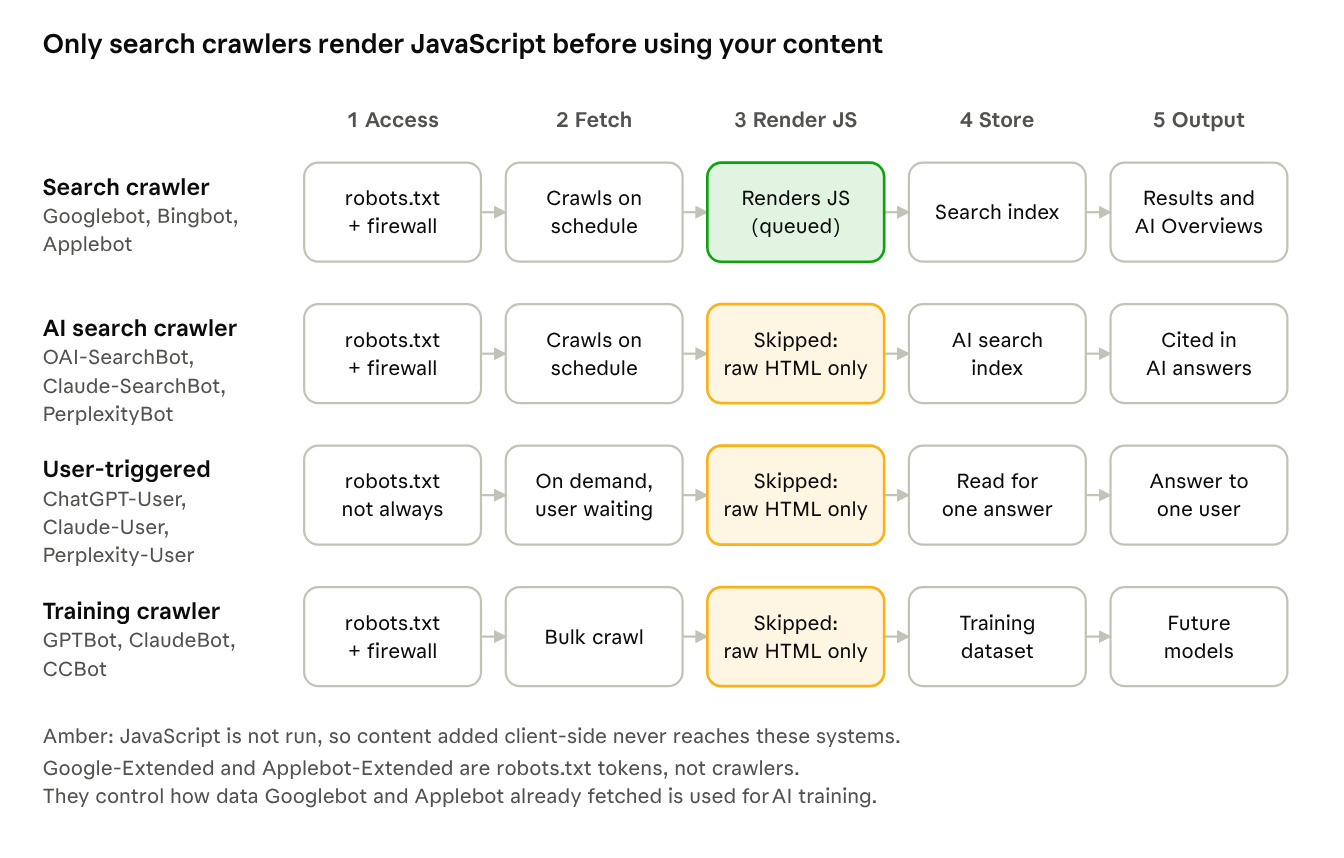
Read each row left to right: a failure at any step ends that route. The amber step is where most AI visibility is lost, and the access step (robots.txt plus your firewall or CDN) is where most accidental blocking happens.
1. Crawlability
A page is crawlable when a bot can discover its URL, request it and get a fast 200 response with the real content. Everything else in this guide depends on this step. [Both]
Discovery
- Link every indexable page from at least one other crawlable HTML page with a plain <a href="…"> link. Bots do not click buttons, submit forms or follow onclick handlers. [Both]
- Keep important pages within three or four clicks of the homepage. Orphan pages that only appear in a sitemap are crawled less often and carry little internal authority. [Search]
- Use descriptive anchor text. It tells search engines and AI systems what the target page is about. [Both]
- Avoid infinite URL spaces: faceted filters, calendar pages and session IDs can generate millions of near-duplicate URLs that waste crawl capacity. [Search]
HTTP status codes
| Code | What bots do | Action |
| 200 | Fetch and process the content | Correct for every live, indexable page |
| 301 / 308 | Follow, transfer signals to the target | Use for permanent moves; point straight to the final URL, no chains |
| 302 / 307 | Follow, usually keep the original URL indexed | Use only for genuinely temporary moves |
| 304 | Reuse the cached copy | Support If-Modified-Since / ETag to save crawl capacity |
| 404 / 410 | Drop the URL over time (410 slightly faster) | Use for content that is gone; never redirect all 404s to the homepage |
| 429 / 503 | Back off and retry later | Use for temporary overload or maintenance; long-running 503s lead to de-indexing |
| 5xx (other) | Slow down crawling; repeated errors drop pages | Monitor and fix; Googlebot reduces crawl rate when errors climb |
| 403 | Treated as blocked or broken | Common cause of accidental AI-bot blocking by firewalls |
A soft 404 (a "not found" page that returns 200) wastes crawl budget and confuses both search and AI systems. Return a real 404. [Both]
Server performance and crawl capacity
- Keep server response time (time to first byte) low for bots, not just for cached human traffic. Googlebot raises or lowers crawl rate based on how fast and healthy the server is. [Search]
- AI retrieval fetchers work in real time while a user waits for an answer. Slow or timing-out pages are more likely to be skipped and not cited. [AI retrieval]
- Crawl budget matters mainly for large sites (tens of thousands of URLs and up) or sites with many URL variants. Smaller sites usually have crawl-access problems, not crawl-budget problems. [Search]
Firewalls, CDNs and bot management
The most common modern crawl failure is not robots.txt. It is a web application firewall (WAF), CDN bot-management setting or rate limiter returning 403, 429 or a challenge page to legitimate crawlers. [Both]
- Check whether your CDN has a one-click "block AI bots" or "block AI training" setting switched on, and whether it also catches retrieval bots you want to allow.
- JavaScript challenges and CAPTCHAs stop all bots. Anthropic, for example, states its crawlers do not try to bypass CAPTCHAs. A challenged page is effectively invisible.
- Allow verified bots by IP range or reverse DNS (see section 8), not by user-agent string alone, which is easy to spoof.
2. Indexability
A crawlable page is indexable when nothing tells the search engine to leave it out and it is distinct and useful enough to keep. Crawlable and indexable are different checks: a page can be fetched perfectly and still never enter the index. [Search]
For AI answer engines, the index is usually the gate. Google AI Overviews and AI Mode draw only on pages in Google's index that are eligible for a snippet. ChatGPT, Claude and Perplexity search features build their own indexes through their search crawlers. [AI retrieval]
Common reasons a page is not indexed
| Cause | How to spot it | Fix |
| noindex in meta robots or X-Robots-Tag | Page source, response headers, Search Console URL Inspection | Remove it from pages that should rank; check templates and staging carry-overs |
| Canonical points elsewhere | rel="canonical" to a different URL; Search Console "Alternate page with proper canonical tag" | Self-canonicalise pages you want indexed |
| Duplicate or near-duplicate content | Many URLs with the same main content (parameters, print versions, HTTP/HTTPS, trailing slash) | Consolidate with 301s and canonicals; one URL per piece of content |
| Soft 404 | Thin or empty pages returning 200 | Return 404/410, or add real content |
| Thin or low-value content | Search Console "Crawled – currently not indexed" | Merge, improve or remove; prune at scale |
| Blocked by robots.txt | Search Console "Blocked by robots.txt" | Unblock if the page should be indexed (robots.txt blocks crawling, not indexing) |
| Content only appears after JavaScript runs, and rendering fails | Rendered HTML in URL Inspection differs from source | Server-render key content (section 6) |
| Login, paywall or geo-block | Bot gets a 401, 403 or redirect | Serve indexable content to verified bots, or use paywall structured data |
Rules of thumb
- Never combine Disallow in robots.txt with noindex on the same URL. If the bot cannot crawl the page it never sees the noindex, and the URL can still be indexed as a bare link from external signals. To remove a page, allow crawling and serve noindex until it drops out. [Search]
- Keep your indexable set intentional. Every URL you want in the index should return 200, self-canonicalise, be in the XML sitemap and be internally linked. Every URL you do not want indexed should fail at least one of those tests clearly. [Both]
- AI systems tend to cite a clear, self-contained page that answers one question well. Consolidating near-duplicates into one strong URL helps both rankings and citation. [Both]
3. robots.txt
robots.txt controls which URLs a compliant bot may crawl. It does not control indexing, it is not a security measure, and it is a request rather than an enforcement. It is also now the main switch for deciding which AI systems can use your content. [Both]
How it works
- It must live at the root of each host: https://www.example.com/robots.txt. Subdomains and each protocol need their own file. [Both]
- It must return 200. A 404 means "crawl everything". A 5xx can make Google treat the whole site as disallowed for a period, so keep it reliably available. [Search]
- Rules are grouped by User-agent. A bot obeys only the most specific group that names it and ignores the group entirely when it finds its own. This is the most common robots.txt mistake: adding a GPTBot group and forgetting it no longer inherits your disallows. [Both]
- Within a group, the most specific (longest) matching path wins; if Allow and Disallow tie, Google uses the less restrictive rule. * matches any sequence of characters and $ anchors the end of the URL. [Search]
- Paths are case-sensitive. User-agent names are not.
- Google ignores Crawl-delay. Bing and Anthropic's bots support it; Perplexity's do not. [Both]
- List sitemaps with absolute URLs: Sitemap: https://www.example.com/sitemap_index.xml. [Both]
- Changes take time to apply. OpenAI and Perplexity both say about 24 hours; Google caches robots.txt for up to 24 hours. [Both]
Common mistakes
- Blocking CSS, JavaScript or image folders. Google needs these to render the page. [Search]
- Using robots.txt to hide sensitive pages. The file is public and lists the very paths you want hidden. Use authentication instead.
- A staging Disallow: / copied to production.
- Blocking a page to "de-index" it (see section 2).
- Relying on robots.txt to stop user-triggered AI fetchers. OpenAI and Perplexity both say their user-initiated agents may not follow robots.txt. [AI retrieval]
- Keeping stale tokens such as anthropic-ai or Claude-Web, which are no longer on Anthropic's current list of bots, while missing the current ones.
Template: allow search and AI retrieval, opt out of AI training
This is the setup most businesses want: stay visible in search and AI answers, keep content out of future training sets. Adjust to your own policy.
# Default for all other bots
User-agent:
Disallow: /cart/
Disallow: /checkout/
Disallow: /account/
Disallow: /?sessionid=
# Search engines (also feed Google AI Overviews / AI Mode, Bing Copilot)
User-agent: Googlebot
User-agent: Bingbot
User-agent: Applebot
Disallow: /cart/
Disallow: /checkout/
Disallow: /account/
# AI search and retrieval: allow
User-agent: OAI-SearchBot
User-agent: ChatGPT-User
User-agent: Claude-SearchBot
User-agent: Claude-User
User-agent: PerplexityBot
User-agent: Perplexity-User
Disallow: /cart/
Disallow: /checkout/
Disallow: /account/
# AI training: opt out
User-agent: GPTBot
User-agent: ClaudeBot
User-agent: Google-Extended
User-agent: Applebot-Extended
User-agent: CCBot
User-agent: meta-externalagent
User-agent: Bytespider
Disallow: /
Sitemap: https://www.example.com/sitemap_index.xml
Note the repeated Disallow lines in each named group: because a named bot ignores the * group, private paths must be restated. Multiple User-agent lines above one rule set are valid and keep the file short.
Testing
- Search Console robots.txt report (fetch status, parse errors, last fetched version).
- Fetch the file as each bot would: curl -A "GPTBot" https://www.example.com/robots.txt. Some CDNs serve different responses by user agent.
- Test individual URLs against the rules with a robots.txt parser (Google publishes an open-source one) before deploying.
4. Meta robots and X-Robots-Tag
Page-level directives control what happens after a page is crawled: whether it is indexed, whether links are followed and how much of it can be shown. They only work if the bot is allowed to crawl the page and read them. [Search]
Two ways to set them
<!-- In the HTML <head> -->
<meta name="robots" content="noindex, follow">
<meta name="googlebot" content="max-snippet:160">
# As an HTTP response header (works for PDFs, images and other non-HTML files)
X-Robots-Tag: noindex
X-Robots-Tag: googlebot: nosnippet
Use name="robots" for all bots, or a bot's own name to target one. Where directives conflict, the most restrictive wins.
Directives that matter
| Directive | Effect in search | Effect on AI features |
| noindex | Page dropped from the index | Out of Google AI Overviews and AI Mode; out of other engines that honour it |
| nofollow | Links on the page not followed for discovery or signals | Indirect: fewer discovered pages |
| nosnippet | No text snippet or featured snippet | Google: content not used as a direct input for AI Overviews and AI Mode |
| max-snippet:[n] | Caps snippet length in characters | Google: also caps what AI features can show |
| data-nosnippet (HTML attribute) | Marked text excluded from snippets | Google lists it among controls for AI features |
| max-image-preview | Controls image preview size | Same limits apply in AI surfaces |
| noarchive | Legacy: Google no longer offers a cache | Bing: excludes content from Copilot answers and training |
| nocache | Not used by Google | Bing: Copilot may use only URL, title and snippet |
| unavailable_after:[date] | Removes the page after a date | Same |
What to know about AI
- Google's snippet controls are blunt. nosnippet, data-nosnippet and max-snippet limit what appears in AI Overviews and AI Mode, but they also strip or shorten your regular search snippet, which can cost clicks. [Search] [AI retrieval]
- Since 31 August 2026 Google also offers a property-level Search generative AI setting in Search Console that excludes a site from AI Overviews, AI Mode and Discover's AI features without affecting regular snippets (see section 10). [AI retrieval]
- Bing has no separate AI training bot. Its AI controls are the noarchive and nocache meta tags, and pages with either still appear in Bing search results. [AI retrieval] [AI training]
- noai and noimageai meta values are proposals, not standards. No major vendor documents honouring them, so do not rely on them. [AI training]
- Most other AI vendors (OpenAI, Anthropic, Perplexity) do not document support for snippet-level meta directives. For them, robots.txt and server-level access are the controls that count. [AI retrieval]
Use data-nosnippet surgically
Wrap only the text you want kept out of snippets and Google's AI features, such as prices that change, legal boilerplate or member-only teasers. The rest of the page stays eligible.
<p>Our standard turnaround is 48 hours.</p>
<div data-nosnippet>Pricing shown is indicative and subject to change.</div>
5. XML sitemaps
An XML sitemap is a list of the URLs you want crawled and indexed. It speeds up discovery and recrawling, especially for new, deep or frequently updated pages. It is a hint, not an instruction, and it does not replace internal linking. [Both]
Rules
- Include only canonical, indexable URLs that return 200. No redirects, 404s, noindex pages, parameter duplicates or URLs blocked by robots.txt. A clean sitemap is a trust signal; a messy one gets ignored. [Search]
- Limit: 50,000 URLs or 50 MB uncompressed per file. Use a sitemap index file to group many sitemaps, and split by type (pages, posts, products, images) so problems are easy to isolate. [Search]
- Use absolute URLs on the same host and protocol as the sitemap.
- Set <lastmod> to the date the main content last changed meaningfully, in W3C format. Google uses it only if it is consistently accurate, so do not stamp every URL with today's date. Google ignores <priority> and <changefreq>. [Search]
- Keep freshness signals honest across the page too: visible updated dates, dateModified in structured data and lastmod should agree. Recency is a factor in which sources AI answer engines choose. [Both]
- Generate sitemaps automatically from the CMS or build so they never drift from the live site.
Example
<?xml version="1.0" encoding="UTF-8"?>
<urlset xmlns="http://www.sitemaps.org/schemas/sitemap/0.9">
<url>
<loc>https://www.example.com/guides/crawler-accessibility/</loc>
<lastmod>2026-11-17</lastmod>
</url>
</urlset>
Submission
- Reference every sitemap (or the index) in robots.txt. This is how AI crawlers and smaller engines find it; PerplexityBot, for example, reads the Sitemap line. [Both]
- Submit in Google Search Console and Bing Webmaster Tools and check the processed and indexed counts. [Search]
- Use IndexNow to tell Bing, Yandex and other participating engines about changes instantly. Bing's index also grounds Microsoft Copilot answers. [Search] [AI retrieval]
- Compare sitemap URLs with indexed URLs and with log-file hits (section 9). Sitemap URLs that bots never request point to a discovery or quality problem.
6. JavaScript rendering
If your main content only appears after JavaScript runs in the browser, Google will usually see it eventually, but most AI crawlers will not see it at all. Large-scale crawl studies by Vercel and MERJ found that GPTBot, OAI-SearchBot, ChatGPT-User, ClaudeBot and other AI crawlers download JavaScript files but never execute them. This is the biggest single technical gap between search visibility and AI visibility. [AI retrieval]
Who renders JavaScript
| Crawler | Executes JavaScript? | What it sees on a client-side-rendered page |
| Googlebot (and so AI Overviews, AI Mode, Gemini grounding) | Yes, in a deferred rendering queue | Full content, sometimes after a delay |
| Bingbot | Yes, with limits | Usually full content |
| Applebot | Yes | Usually full content |
| GPTBot, OAI-SearchBot, ChatGPT-User | No | Only the initial HTML |
| ClaudeBot and other Anthropic agents | No (per published studies) | Only the initial HTML |
| PerplexityBot | No (per published studies) | Only the initial HTML |
| Meta-ExternalAgent, Bytespider, CCBot | No | Only the initial HTML |
Vendors change their crawlers without notice, so treat the "No" rows as "assume not" and test your own pages.
Rendering strategies
| Approach | How it works | Search | AI crawlers |
| Static site generation (SSG) | HTML built ahead of time | Excellent | Excellent |
| Server-side rendering (SSR) | HTML built per request on the server | Excellent | Excellent |
| Hybrid / hydration (Next.js, Nuxt, Astro, SvelteKit) | Server HTML, then JavaScript adds interactivity | Excellent | Excellent, if content is in the server HTML |
| Prerendering for bots | A rendered snapshot served to crawlers | Works; keep identical to user content | Works |
| Client-side rendering (CSR, SPA) | Empty shell; JavaScript builds the page | Usually works, slower | Fails |
Implementation checklist
- Put all primary content, headings, internal links, canonical tags, meta robots and structured data in the initial server HTML. [Both]
- Do not rely on JavaScript to inject or change rel="canonical", noindex or <title>. Google may process the raw and rendered versions differently. [Search]
- Content hidden behind tabs, accordions or "load more" buttons is fine if it is in the HTML on load. It is lost if it is fetched only on click. [Both]
- Use real <a href> links for navigation and pagination, not JavaScript routers alone.
- Lazy-load images with loading="lazy" and a real src, not by swapping attributes with JavaScript.
- Prerendered or dynamic-rendered snapshots must match what users see. Serving different content to bots is cloaking.
How to test
- See what a non-rendering AI crawler sees: curl -s -A "Mozilla/5.0 (compatible; GPTBot/1.3)" https://www.example.com/page | less. If your main text is not in the output, AI crawlers cannot read it.
- Disable JavaScript in Chrome DevTools and reload the page.
- Compare View source (raw HTML) with Inspect (rendered DOM) on each page template.
- Use Search Console URL Inspection, "View crawled page", to see Google's rendered HTML and any blocked resources.
- Ask an AI assistant with browsing to summarise a specific URL. A vague or wrong summary often means it saw an empty shell.
7. Canonicalisation
Every piece of content should have one preferred URL, and every signal on the site should point to it. Canonicalisation stops ranking signals being split across duplicates and tells AI systems which version to cite. [Both]
Signals, strongest first
- 301/308 redirects from duplicates to the preferred URL. The strongest signal; use for HTTP→HTTPS, non-www→www (or the reverse), trailing-slash and case variants.
- rel="canonical" in the HTML head or an HTTP Link header. A strong hint, not a directive; Google can override it if other signals disagree.
- Internal links that always point to the preferred URL.
- XML sitemap listing only preferred URLs.
- hreflang annotations that reference only canonical URLs.
When these agree, Google follows them. When they conflict, Google picks its own canonical, which may not be the one you want. [Search]
Implementation
<link rel="canonical" href="https://www.example.com/guides/crawler-accessibility/">
- Use absolute URLs. Self-reference canonical pages. [Search]
- One canonical tag per page, in the <head>, in the server HTML. Duplicate or JavaScript-injected tags are often ignored. [Both]
- Do not canonicalise paginated pages (page 2, 3…) to page 1; each page should self-canonicalise. [Search]
- Do not combine noindex with a canonical pointing elsewhere. They send opposite instructions.
- Keep tracking parameters (utm_, gclid, fbclid) out of internal links. Let the canonical tag consolidate external ones.
- For faceted navigation, decide which filter combinations deserve their own indexable page. Canonicalise or block the rest, and keep their links crawl-light.
- Syndicated content: ask partners to add a cross-domain canonical to your original, or a noindex. Otherwise the syndicated copy may be cited instead of yours. [Both]
hreflang interplay
- Each language or regional version self-canonicalises; never canonicalise all languages to one version. [Search]
- hreflang sets must be reciprocal and include x-default.
- AI systems do not document hreflang support, so make the language of each page obvious from its URL, <html lang> attribute and content. [AI retrieval]
Checking
- Search Console URL Inspection shows the "User-declared canonical" and the "Google-selected canonical". A mismatch is a problem to investigate.
- Crawl the site with Screaming Frog or Sitebulb and report canonicals that point to non-200, non-indexable or redirected URLs, and chains of canonicals.
8. Bot access and verification
Know which bots you want, let them in reliably, and verify that a visitor claiming to be one really is. Many fake bots use Googlebot or GPTBot user agents to scrape sites. [Both]
Bot reference (November 2026)
| robots.txt token | Operator | Purpose | Category | Follows robots.txt? | Blocking costs you |
| Googlebot | Search crawling and rendering; also feeds AI Overviews and AI Mode | Search + AI retrieval | Yes | Google Search and Google AI features | |
| Google-Extended | Control token only, no crawler. Gemini training and grounding | AI training | Yes (token) | Nothing in Search | |
| Bingbot | Microsoft | Bing search; grounds Copilot | Search + AI retrieval | Yes | Bing, Copilot and engines built on Bing |
| Applebot | Apple | Siri, Spotlight, Safari suggestions | Search | Yes | Apple search surfaces |
| Applebot-Extended | Apple | Control token only, no crawler. Apple AI training | AI training | Yes (token) | Nothing in Apple search |
| OAI-SearchBot | OpenAI | ChatGPT search index | AI retrieval | Yes | Appearing in ChatGPT search answers |
| ChatGPT-User | OpenAI | Fetches pages when a ChatGPT user or GPT asks | AI retrieval (user-triggered) | May not apply, per OpenAI | Live fetches in ChatGPT |
| GPTBot | OpenAI | Model training | AI training | Yes | Nothing in ChatGPT search |
| OAI-AdsBot | OpenAI | Validates ad landing pages | Ads | Not stated | Ad eligibility in ChatGPT |
| Claude-SearchBot | Anthropic | Indexes for Claude's search results | AI retrieval | Yes | Visibility in Claude search answers |
| Claude-User | Anthropic | Fetches pages when a Claude user asks | AI retrieval (user-triggered) | Yes, per Anthropic | Live fetches in Claude |
| ClaudeBot | Anthropic | Model training | AI training | Yes; supports Crawl-delay | Nothing in Claude search |
| PerplexityBot | Perplexity | Perplexity search index | AI retrieval | Yes | Being listed and linked in Perplexity |
| Perplexity-User | Perplexity | Fetches pages when a user asks | AI retrieval (user-triggered) | Generally no, per Perplexity | Live fetches in Perplexity |
| meta-externalagent | Meta | Training (and some indexing) | AI training | Yes | Meta AI use of content |
| CCBot | Common Crawl | Open web dataset used by many AI labs | AI training | Yes | Inclusion in Common Crawl |
| Bytespider | ByteDance | Training | AI training | Inconsistent reports | Little search value |
Match on the token, not the full string: version numbers in user agents change. Check each vendor's documentation at least quarterly; this list changes several times a year.
Verifying real bots
- Reverse DNS then forward DNS for search engines: the IP should resolve to .googlebot.com, .google.com or .googleusercontent.com (Google), .search.msn.com (Bing) or *.applebot.apple.com (Apple), and that hostname should resolve back to the same IP. [Search]
- Published IP ranges for AI bots: OpenAI publishes openai.com/gptbot.json, openai.com/searchbot.json and openai.com/chatgpt-user.json; Perplexity publishes perplexity.ai/perplexitybot.json; Anthropic publishes its crawler IP list in its help centre; Google publishes JSON ranges for its crawlers. Automate a daily refresh into your WAF allowlist. [AI retrieval]
- Treat any request with a known bot user agent from an unlisted IP as an impostor. Block or rate-limit it.
CDN and WAF settings
- Audit Cloudflare, Akamai, Fastly, AWS WAF and hosting-level bot protections. Many now have AI-bot presets. Cloudflare's own July 2026 announcement says multi-purpose crawlers such as Googlebot, Applebot and Bingbot will be blocked for customers who select its "block Training" option, so check this setting carefully. [Both]
- Cloudflare also planned to switch Training and Agent access off by default for new domains with ad-supported pages from 15 September 2026. Existing customers keep their settings. Review the defaults on any site added recently.
- Prefer robots.txt for stating policy, and the WAF for enforcing it against bots that do not comply. Anthropic warns that blocking its IP addresses can stop its bots reading robots.txt at all, so an IP block may not register as a clean opt-out.
- Rate-limit by verified bot, not blanket. Return 429 with a Retry-After header when needed, never 403 or a challenge page to bots you want.
- Allow bots to fetch robots.txt, sitemaps, CSS and JavaScript even where page access is restricted.
9. Server-log analysis
Server logs are the only complete record of what bots actually did on your site. Search Console shows Google's view; logs show every bot, including AI crawlers that offer no reporting tools at all. [Both]
What to collect
- Raw access logs from the origin and the CDN edge. Many AI requests are answered from cache or blocked at the edge and never reach the origin.
- Fields: timestamp, client IP, method, full URL including query string, status code, bytes, response time, user agent, referrer, and the CDN's bot classification or verified-bot flag if available.
- At least 30 days, ideally 90, to see crawl cycles. Check your privacy policy and retention rules before storing IPs.
Questions logs answer
| Question | What to look at | Supports |
| Which bots visit, and how much? | Verified requests per bot per day | Both |
| Are bots wasting crawl on junk? | Share of bot hits on parameters, filters, redirects, 404s | Search |
| Are important pages crawled? | Sitemap URLs with zero hits from Googlebot or OAI-SearchBot in 30 days | Both |
| Are bots being blocked by mistake? | 403, 429 and 5xx rates per bot; sudden drops to zero | Both |
| How fast is the site for bots? | Median and 95th-percentile response time per bot | Both |
| Is new content discovered quickly? | Hours from publish to first hit per bot | Both |
| Are AI assistants reading pages for real users? | ChatGPT-User, Claude-User and Perplexity-User hits by URL | AI retrieval |
| Is AI training crawling heavy? | GPTBot, ClaudeBot, CCBot, meta-externalagent volume and bandwidth | AI training |
| Are fake bots scraping? | Bot user agents from IPs outside published ranges | Both |
User-triggered fetches (ChatGPT-User, Claude-User, Perplexity-User) are a useful proxy for demand: each one usually means a real person asked an AI about that page or topic. Pair them with referral traffic from chatgpt.com, claude.ai, perplexity.ai, copilot.microsoft.com and gemini.google.com in analytics. [AI retrieval]
Google-Extended and Applebot-Extended never appear in logs because they are control tokens, not crawlers. Their absence is expected.
Quick commands
# Requests per AI/search bot (combined log format)
grep -Eio 'Googlebot|bingbot|Applebot|GPTBot|OAI-SearchBot|ChatGPT-User|ClaudeBot|Claude-SearchBot|Claude-User|PerplexityBot|Perplexity-User|meta-externalagent|CCBot|Bytespider' access.log \
| sort | uniq -c | sort -rn
# Status codes returned to one bot
grep 'OAI-SearchBot' access.log | awk '{print $9}' | sort | uniq -c | sort -rn
# Top URLs fetched for users by ChatGPT
grep 'ChatGPT-User' access.log | awk '{print $7}' | sort | uniq -c | sort -rn | head -50
Tools
- Screaming Frog Log File Analyser, Botify, Oncrawl, JetOctopus or Lumar for SEO-focused log analysis.
- Cloudflare AI Crawl Control (or your CDN's equivalent) for AI-bot dashboards at the edge.
- BigQuery, Elasticsearch or a data warehouse for large sites; join logs to your sitemap and crawl data by URL.
Routine
- Weekly: status-code and volume check per bot, alert on spikes or drops.
- Monthly: crawl coverage of sitemap URLs; top AI-fetched URLs.
- After any release, CDN change or robots.txt edit: check the next 48 hours of bot traffic for 403s, 5xxs or missing bots.
10. Controls affecting AI crawlers
There is no single "block AI" switch. Training, AI search indexing, live user-triggered fetching and AI features inside search engines each have their own control, and some controls also affect regular search. Decide your policy for each, then apply the matching control.
Choose your control
| You want to… | Do this | Side effects |
| Keep content out of OpenAI training | Disallow GPTBot | None on ChatGPT search |
| Keep content out of Anthropic training | Disallow ClaudeBot | None on Claude search |
| Keep content out of Gemini training and grounding | Disallow Google-Extended | None on Google Search, AI Overviews or AI Mode |
| Keep content out of Apple AI training | Disallow Applebot-Extended | None on Siri or Spotlight |
| Keep content out of Meta, Common Crawl, ByteDance training | Disallow meta-externalagent, CCBot, Bytespider | Common Crawl feeds many third-party models |
| Leave Google AI Overviews and AI Mode | Search Console → Settings → Search generative AI → exclude (property level) | Regular results and snippets unaffected; does not control training |
| Limit what Google AI features quote from a page | nosnippet, max-snippet or data-nosnippet | Also limits your regular search snippet |
| Leave Bing Copilot answers | noarchive meta tag (also opts out of Microsoft training) | Still appears in Bing search |
| Let Copilot show only your link | nocache meta tag | Copilot uses URL, title and snippet only |
| Leave ChatGPT, Claude or Perplexity search | Disallow OAI-SearchBot, Claude-SearchBot, PerplexityBot | Lose citations and referral traffic from those tools |
| Stop live fetches when users paste your URL | Disallow Claude-User (honoured); WAF rules for ChatGPT-User and Perplexity-User | Users of those tools cannot read your page through them |
| Stop everything, including non-compliant bots | WAF or CDN block by verified IP plus robots.txt | Check it does not catch Googlebot, Bingbot or Applebot |
Opt-outs are not retroactive. Content already collected may remain in existing models and datasets. [AI training]
Retrieval is where visibility lives
Citations in AI answers come from retrieval bots and search indexes, not training crawlers. Blocking GPTBot or ClaudeBot does not remove you from ChatGPT or Claude answers; blocking OAI-SearchBot, Claude-SearchBot or PerplexityBot does. For most businesses that want AI visibility, the sensible default is: allow all search and retrieval bots, decide training on its business merits. [AI retrieval]
llms.txt and other AI files
llms.txt is a proposed Markdown file summarising a site for language models. As of late 2026:
- Google states that Search, including its AI features, does not use llms.txt or other special AI files, and that they neither help nor harm visibility.
- No major AI vendor documents fetching llms.txt from third-party sites when crawling. Several large studies (Ahrefs, Otterly, Limy) found AI crawlers almost never request it; Ahrefs found 97% of files received zero requests in May 2026.
- It can still be useful as developer documentation for coding assistants and agents that a user points at it.
Recommendation: treat llms.txt as optional and low priority. Clean server-rendered HTML, clear headings and accurate structured data do far more for AI retrieval. [AI retrieval]
Licensing and usage signals (emerging)
- Cloudflare Content Signals add machine-readable preferences to robots.txt, for example Content-Signal: search=yes, ai-train=no. They express intent; compliance is voluntary.
- RSL (Really Simple Licensing) lets publishers state licensing and payment terms for AI use.
- Pay-per-crawl schemes at the CDN level charge AI crawlers for access.
None of these is yet a universally honoured standard. Use them to state your terms, and enforce at the WAF if terms matter commercially. [AI training]
11. Search vs AI retrieval: what each recommendation supports
Most fundamentals help both. The differences cluster around JavaScript, bot-specific access and snippet controls.
| Recommendation | Traditional search | AI retrieval | AI training | Notes |
| Fast, reliable 200 responses | High | High | Low | Live AI fetchers have tight timeouts |
| Crawlable <a href> internal links | High | High | Medium | |
| Server-rendered main content | Medium (Google renders JS) | Critical | Medium | Biggest single gap between search and AI |
| robots.txt allows search engines | Critical | High (Google, Bing AI features) | None | |
| robots.txt allows AI search/retrieval bots | None | Critical | None | OAI-SearchBot, Claude-SearchBot, PerplexityBot |
| robots.txt disallows training bots | None | None | Controls it | GPTBot, ClaudeBot, Google-Extended, Applebot-Extended, CCBot |
| WAF/CDN allows verified bots | Critical | Critical | Controls it | Most common silent failure |
| Correct noindex usage | Critical | High (Google AI features) | None | |
| nosnippet / max-snippet | Reduces snippets | Reduces Google AI use | None | Costs search CTR |
| Search Console generative AI setting | None | Controls Google AI features | None | Property-level |
| noarchive / nocache | None | Controls Bing Copilot | noarchive controls Microsoft training | |
| Clean XML sitemap with accurate lastmod | High | Medium | Low | AI bots read the Sitemap line |
| IndexNow | Medium (Bing, Yandex) | Medium (Copilot) | None | |
| Consistent canonicalisation | High | Medium | Low | Decides which URL gets cited |
| hreflang | High | Low | None | AI support undocumented |
| Structured data (JSON-LD) in server HTML | High (rich results) | Medium | Low | Helps entity understanding |
| Clear headings, self-contained answers | Medium | High | Low | Easier passage extraction |
| Log-file monitoring | High | High | High | Only full view of AI bots |
| llms.txt | None (Google confirmed) | Low / unproven | None | Optional |
Critical = the visibility channel fails without it. High = strong positive effect. Medium / Low = helpful but not decisive. None = no documented effect.
12. Diagnostic checklist
Work top to bottom: each stage depends on the one before it. Tick items as you confirm them; anything you cannot tick is a finding.
Stage 1: Policy
- ☐ Written decision for each bot category: search, AI search/retrieval, user-triggered fetchers, AI training [Both]
- ☐ Decision on Google AI features (Search Console generative AI setting) and Bing Copilot (noarchive / nocache) [AI retrieval]
Stage 2: Access
- ☐ /robots.txt returns 200 on every host and subdomain, with no parse errors [Both]
- ☐ robots.txt groups match policy; named bot groups restate needed private-path disallows [Both]
- ☐ Current tokens present (OAI-SearchBot, Claude-SearchBot, Claude-User, Perplexity-User); stale ones removed [AI retrieval]
- ☐ CSS, JavaScript and image paths not blocked [Search]
- ☐ curl -A test for Googlebot, Bingbot, GPTBot, OAI-SearchBot, ClaudeBot, Claude-SearchBot and PerplexityBot returns 200 and real content, not 403, 429 or a challenge page [Both]
- ☐ CDN/WAF AI-bot and "block training" settings reviewed; Googlebot, Bingbot and Applebot not caught [Both]
- ☐ Verified-bot allowlist uses published IP ranges or reverse DNS, refreshed automatically [Both]
Stage 3: Crawlability
- ☐ Key pages reachable within 3–4 clicks via plain <a href> links [Both]
- ☐ No redirect chains or loops; internal links point to final URLs [Search]
- ☐ Removed content returns 404/410; no soft 404s [Both]
- ☐ Bot response times acceptable (check 95th percentile in logs) [Both]
- ☐ Parameter, facet and session URLs controlled [Search]
Stage 4: Rendering
- ☐ Main content, headings and links present in raw HTML (curl or JavaScript disabled) on every template [AI retrieval]
- ☐ Canonical, meta robots, title and structured data in server HTML, not injected by JavaScript [Both]
- ☐ Search Console rendered HTML matches what users see [Search]
Stage 5: Indexability
- ☐ No unintended noindex (meta or X-Robots-Tag) on indexable templates [Search]
- ☐ No URL both disallowed in robots.txt and tagged noindex [Search]
- ☐ Snippet directives (nosnippet, max-snippet, data-nosnippet) used only where intended [Both]
- ☐ Search Console Page indexing report reviewed; "Crawled – currently not indexed" investigated [Search]
Stage 6: Canonicalisation
- ☐ One preferred version of host, protocol, slash and case, enforced by 301 [Search]
- ☐ Self-referencing absolute canonical on every indexable page [Both]
- ☐ Google-selected canonical matches the declared one on sampled URLs [Search]
- ☐ hreflang sets reciprocal, canonical-only, with x-default [Search]
Stage 7: Sitemaps
- ☐ Sitemaps contain only 200, canonical, indexable URLs [Search]
- ☐ lastmod accurate and consistent with on-page and structured-data dates [Both]
- ☐ Sitemaps listed in robots.txt and submitted to Google and Bing; IndexNow enabled [Both]
Stage 8: Monitoring
- ☐ Origin and CDN logs retained for at least 30 days with user agent, IP, status and response time [Both]
- ☐ Weekly per-bot status-code and volume report, with alerts [Both]
- ☐ Sitemap coverage by Googlebot and OAI-SearchBot / Claude-SearchBot / PerplexityBot checked monthly [Both]
- ☐ AI referral traffic and user-triggered fetches tracked by URL [AI retrieval]
- ☐ Bot reference list (section 8) reviewed against vendor docs each quarter [Both]
Sources and further reading
Vendor documentation is the source of truth for bot names and behaviour; re-check it before relying on the tables above.
Vendor documentation
- OpenAI: Overview of OpenAI crawlers
- Anthropic: Does Anthropic crawl data from the web, and how can site owners block the crawler?
- Perplexity: Perplexity crawlers
Reporting and analysis
- PPC Land: OpenAI revises ChatGPT crawler documentation (Dec 2025)
- Search Engine Journal: OpenAI's crawler docs now list OAI-AdsBot
- Search Engine Journal: Anthropic's Claude bots make robots.txt decisions more granular
- Vizup: Google generative AI controls, AI Overviews vs training
- PinMeTo: Google details how to control content in AI search
- Layershift: Which AI bots should you allow? (Cloudflare July 2026 changes, Applebot-Extended, Bing controls)
- Vercel: The rise of the AI crawler (JavaScript rendering study)
- Ahrefs: We analyzed 137K sites – 97% of llms.txt files never get read
- Optimizely: Does llms.txt work?
More insights from the blog



Still have questions? Get in touch for a free strategy session.